

Summary: AI agents are moving into everyday business software, but the useful starting point is one repeatable job. This guide helps small businesses choose between a chatbot, a fixed automation and an AI-assisted workflow. Follow a practical example from website inquiry to CRM record, draft reply and owner approval. Compare five possible first projects, identify the data and integrations each needs, and use a 30-day pilot to measure time saved, corrections and missed work before expanding access.
A website inquiry arrives while you are serving a customer. Later, you copy the details into your CRM, work out what the person needs, write a reply and remember to follow up. An AI-assisted workflow can prepare much of that work, provided it knows which information to use and where to stop for your decision.
AI agents are a timely business topic, but a promising demonstration is not a working business process. The useful question is specific: which repeatable job would you like completed more reliably, and how will you check the result?
Start with one job you can check
- Choose a frequent task with a clear starting point and a visible result.
- Connect only the records and tools that task needs.
- Review customer-facing messages and sensitive changes before they happen.
- Measure corrections, missed work and time spent during a small pilot.
Why AI workflow automation matters now
Business software is moving beyond a separate chat window. In its 8 October 2026 CRM announcement, Microsoft described bringing customer context, proposed updates and response drafting into the tools sales and service teams already use. Product availability varies, but the direction is relevant: help with the next business action, using the records behind it.
For a small Toronto service business, that might mean a better morning task list or a prepared reply to a quote request. You do not need to imitate an enterprise rollout. Begin with a problem that already costs attention every week. A useful outcome could be fewer inquiries left without a next step, rather than a dramatic claim about replacing an entire team.
Do you need a chatbot, fixed automation or an AI agent?
These tools overlap, and vendors use the terms differently. Compare the work you need done rather than buying a label.
| Approach | Useful example | What to check |
|---|---|---|
| Website chatbot | Answer questions from an approved service guide and offer a contact route. | Does it recognise when the answer is missing and hand the visitor to a person? |
| Fixed automation | Copy a valid form submission into a CRM and notify the right team member. | Are required fields, duplicates and failed deliveries handled correctly? |
| AI-assisted workflow | Read an inquiry, summarise it and propose a reply using the matching customer record. | Can you inspect the source, correct the result and control which actions need approval? |
If the form always has the same fields and the destination is fixed, ordinary automation may be enough. AI becomes useful when the job includes varied language or context. It also introduces uncertainty: a fluent summary can still misunderstand a request. Keep the original message available beside the proposed result.
A public AI chatbot and an internal CRM assistant serve different audiences. Decide which problem you have before connecting both to the same customer data.
Five practical AI workflows for a small business
The examples below are possible pilot designs, not claims that every platform supports them or that a particular business has achieved these results.
| Workflow | Useful prepared result | Keep a person involved |
|---|---|---|
| New inquiries | Summary, service requested and suggested next step. | Check ambiguous requests, missing details and the proposed customer match. |
| Follow-up preparation | A draft based on the latest conversation and agreed next step. | Review the recipient and text; stop if a newer reply changes the situation. |
| Daily task digest | Open tasks grouped by customer, with overdue work clearly marked. | Confirm dates and priorities; do not let the summary silently complete tasks. |
| Meeting notes | Proposed action items linked to approved notes. | Confirm owners, dates and commitments before saving them. |
| Support requests | A category, relevant help article and draft response. | Escalate complaints, access requests and situations outside the approved guide. |
Choose the row where mistakes are easiest to spot and recover from. If your customer records are inconsistent, a read-only digest may be a better first project than automatic record updates.
Example: turn a website inquiry into a reviewed reply
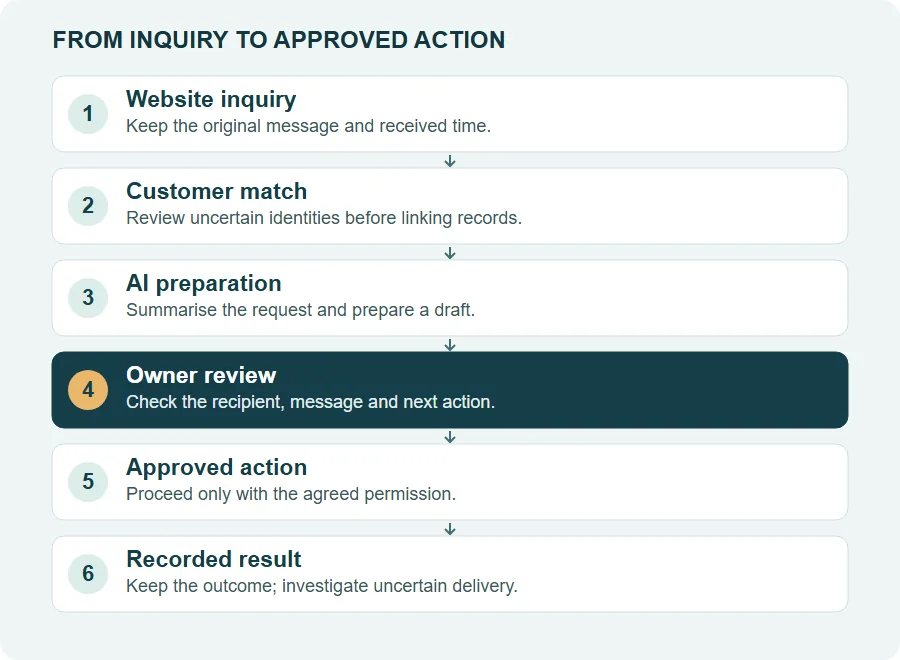
Imagine a contractor receives a request for a kitchen renovation estimate. The form includes a name, email, project description and preferred contact method. This is an illustrative workflow; no real customer information is needed to explain it.
- Capture the original. Save the submission with its received time and a reference back to the source. Confirm that the form reached the business, rather than relying only on a success message on the website.
- Match carefully. Look for the exact customer identity in the CRM. A similar company name is not enough to merge two records. Flag an uncertain match for review.
- Prepare the useful work. Summarise the requested job, identify unanswered questions and draft a response. Use approved service information. Do not invent availability, pricing or a promise to visit.
- Show the proposed action. Display the recipient, subject and complete message. Let the owner edit it. If the customer has replied since preparation, refresh the context before sending.
- Record the outcome. After an authorised send, retain the delivery result and next step. If delivery is uncertain, show that state for investigation instead of blindly sending the same message again.
Ask a supplier to demonstrate the awkward cases too: the same submission arriving twice, two contacts sharing a company, a missing email address and a disconnected CRM. The best-looking successful run tells you little about those failures.
A new CRM connection also needs permission to read or write the relevant records. “We can connect through an API” should lead to a check of the actual account, supported fields and error handling. It is not proof that a complete integration is already running.
Should you use existing tools or build a custom workflow?
Start by listing the tools you already pay for. Your CRM may have an integration or workflow feature that covers most of the requirement. An integration platform may connect the missing steps. Check the exact plan, access controls and operating limits before committing.
A custom workflow can make sense when your customer relationships, approval steps or several connected systems do not fit an existing product. It also creates ongoing work: someone must monitor failures, maintain connections and test changes when a provider updates its software. A low setup price without that responsibility defined can become expensive later.
For a scoped project, compare AI agent and automation services with custom AI software development. Bring a sample process and explain the exception that causes the most trouble. That gives a developer something concrete to assess.
Questions to ask before giving a workflow access
- Which accounts and records can it read? Which fields can it change?
- Can you approve the exact action, edit its content and revoke access?
- What happens when data is missing, a connection fails or a result is uncertain?
- Where are customer data and logs stored, who can access them, and how are they removed?
- Who receives an error alert and takes responsibility for fixing it?
For a first customer-email pilot, keep sending under review. Personalisation should use the right person's verified details. A greeting with a name does not establish that the rest of the message belongs to that customer, and it does not make a contact list suitable for a marketing campaign.
Run a 30-day pilot before expanding
Give the pilot one owner and a small scope. The following schedule is a planning example; a complex integration may need longer preparation.
- Week one: measure the current job. Count how often it happens, how long it takes and what is missed. Agree on the intended result and the stop conditions.
- Week two: prepare without acting. Run the workflow on a limited, approved set of examples. Compare summaries and drafts with the original records. Include unusual inputs.
- Week three: use it with review. Let the team work from the prepared results while recording edits, rejected suggestions and failures. Keep the manual route available.
- Week four: decide. Compare net time spent, accuracy and completeness with the baseline. Expand only if the result is useful and someone can maintain it.
Use a small scorecard: jobs attempted, jobs completed correctly, material corrections, duplicates, missed jobs and total staff time. Include time spent reviewing and fixing the workflow. A faster draft is not a saving if checking it takes longer than writing the original.
For example, suppose a process happens 60 times a month and the pilot saves three net minutes per occurrence after review. That is three hours per month. This is arithmetic using hypothetical inputs, not a typical result. Compare your measured hours with setup, subscriptions, usage charges and maintenance before deciding whether the project pays off.
Zapier's official agent guidance also emphasises explicit instructions, focused scope and testing. Those principles are a useful starting point across tools; the details still depend on your software and process.
Common questions about AI agents
What is an AI agent for a small business?
An AI agent combines a language model with connected tools to carry out a defined job. Its useful scope depends on the data it can access, the actions it is allowed to take and the checks built around those actions.
Which business workflow should I automate first?
Start with a frequent, clearly defined task whose result a person can easily check, such as preparing an inquiry summary or a daily task digest. Record the current time spent and correction rate so you can compare the pilot fairly.
Can AI update my existing CRM?
Possibly. Check the CRM's supported API or integration, account permissions, field mapping and duplicate handling. Test with a small, approved set of records before enabling writes. A chat interface alone does not establish a working connection.
Should an AI agent send customer emails automatically?
For a first pilot, keep sending behind review of the exact recipients, subject and message. A useful system can prepare a personalized draft while the owner decides whether it should be sent. Check the sending provider's requirements separately.
Do I need a custom CRM to use AI automation?
No. Existing software or an integration platform may cover the job. Consider a custom workflow when the required process, approvals or data relationships do not fit supported tools, and include maintenance and operating costs in the decision.
Which part of your work keeps getting repeated?
Tell BridgeWeb which task takes time, which software you use and where you want a person to approve the result. We can assess whether an existing integration or a scoped custom workflow is a sensible fit.
Sources and further reading
- Microsoft: CRM and agent workflows, 8 October 2026
- Zapier: focused instructions, testing and maintenance
Reviewed November 2026. Software capabilities and plan requirements change. Examples and pilot targets in this guide are illustrative, not promised business results.

