
Summary: The October 2026 TeamUpdraft incident has left WordPress owners with a practical question: does updating UpdraftPlus mean the site is safe? The useful answer depends on its connections and what happened before the update. This guide separates the backup plugin from cloud access, checks the new 26 October release, and gives Toronto and Canadian businesses a clear next step. Use the exposure table, printable checklist and developer handoff to check access, preserve evidence and confirm that backups still work, without assuming every installation was hacked.
A backup plugin is supposed to be the thing you rely on when something goes wrong. So a security notice from its developer is unsettling. If you use UpdraftPlus on a business website, the useful question is simple: what do you need to check on your own site today?
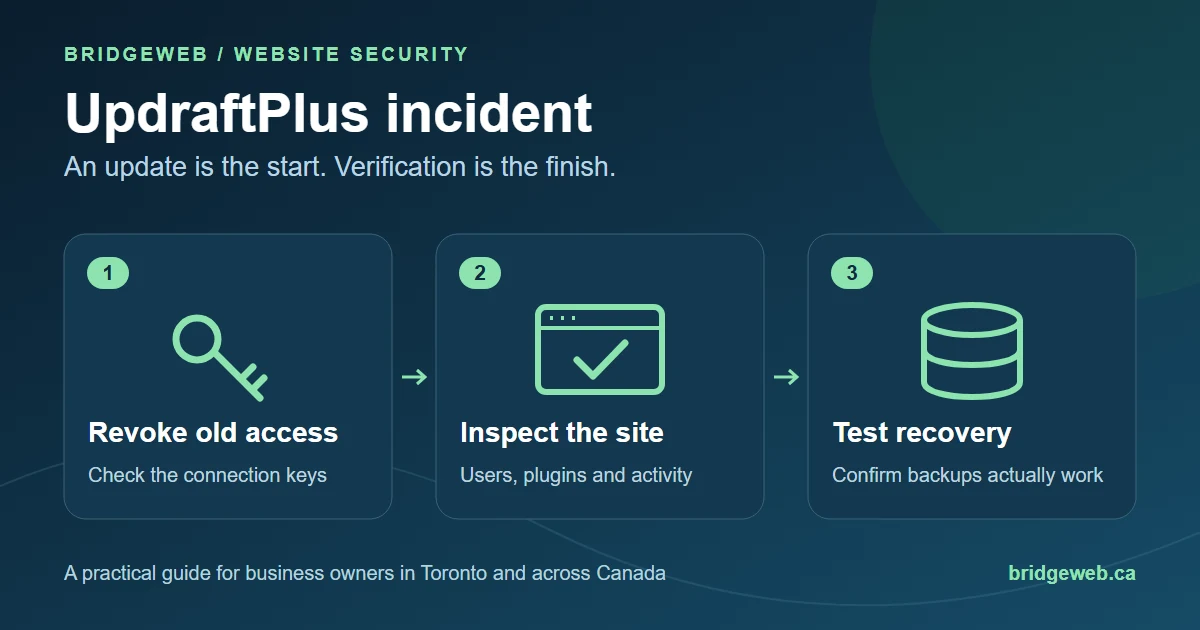
You do not need to become a security researcher to ask the right questions. You do need to separate three jobs: stopping unwanted access, finding out whether anything changed, and checking that you can recover. Updating a plugin answers only part of that.
The short answer
- The October incident concerns TeamUpdraft's systems and access to connected websites. It does not establish that every UpdraftPlus installation was hacked.
- Check the actual connection settings and your product's official instructions. Memory is not a reliable record of how a site was connected.
- Use the latest official update, then inspect the site separately. An update is not a clean-up report.
- Preserve recovery copies and confirm the next backup finishes. Do not trade a possible security problem for a definite loss of recent orders.
What happened in the UpdraftPlus breach?
TeamUpdraft reported unauthorised access to its website over 17-18 October 2026. Its notice describes possible exposure of customer information and keys used by connected services. The vendor says the UpdraftPlus plugin and its downloads were not affected. Read the official incident notice for the product-specific position as the investigation develops.
Wordfence's original reporting describes attackers using trusted UpdraftCentral keys to send commands to connected WordPress sites. That is why a site can be up to date for a different flaw and still need attention. Revoking access and investigating what happened are separate tasks.
This article is an owner checklist, not a finding about your website. A Toronto shop with one WordPress installation needs a different response from an agency managing many connected sites. Establish the facts of the installation before paying for a solution.
Which situation describes your website?
| Your situation | Your next check |
|---|---|
| Connected to UpdraftCentral Cloud | Follow the vendor's connection-key and website-review instructions for each site. |
| UpdraftPlus Premium, or a TeamUpdraft account | Review the account-specific notice even if you do not remember using Central. The vendor specifically asks Premium users to inspect their websites. |
| Free plugin, no vendor account or cloud connection | The vendor gives this group different guidance. Keep updated; do not assume the plugin's presence means a confirmed breach. |
| Self-hosted UpdraftCentral | The vendor lists it as unaffected by this incident. Confirm that yours really is self-hosted. |
| You are not sure | Ask whoever maintains the site to show the actual connection list and explain its history. |
If your developer cannot be reached, start by recovering control of the hosting and administrator accounts. Our guide to taking back control when a web developer disappears explains that ownership problem without assuming a rebuild is the answer.
Which UpdraftPlus version should you use today?
Checked 27 October 2026: the free plugin's current release is 1.26.14, dated 26 October. Its changelog says automatic addition of websites to UpdraftCentral is now disabled by default. See the WordPress.org release history.
Older incident instructions mention 1.26.12. The vendor changelog records 1.26.13 as correcting that release's revocation behaviour. Use the latest official version available to you, rather than stopping at a version copied from an old headline. Premium users should check their own update channel; the free release number alone does not verify the latest Premium build.
That is an update check, not a security verdict. Keep the version and the installation time in your record, then continue with the access and recovery checks below.
Make a record before you change things
It is tempting to delete anything unfamiliar immediately. First write down what you found and ask your host to preserve useful logs. Record the domain, discovery time, installed version and the names of unexpected items. Keep screenshots privately. Do not put passwords, keys or customer information into a public support thread.
WordPress's hacked-site guidance recommends documenting the incident and involving the hosting provider. That record helps a second person understand the problem instead of starting from a vague message that the site looked strange yesterday.
For a small business, the practical goal is a handoff somebody can act on. You do not need a perfect forensic report before contacting your host. You do need to distinguish something you observed from something you fear might have happened.
Check access from WordPress itself
Use the website's own WordPress dashboard. Follow the current official instructions for reviewing and removing old UpdraftCentral connection keys. The relevant settings are under Settings, UpdraftPlus, Advanced Tools, UpdraftCentral; labels can vary. If you cannot identify the settings confidently, ask the person responsible for the site to do it with you.
Changing a login password and revoking a service key address different access routes. Do not accept one as proof that the other was handled. For a TeamUpdraft account, follow the notice's password and two-factor reset instructions as well.
Ask for the result in plain language: was a connection present, what was removed, and was the website checked afterwards? That is a useful question for your existing provider or for a website maintenance service. You should not need to buy a new website to get an answer.
Look beyond the Plugins screen
Review unexpected users, unfamiliar plugins, must-use plugins and recent changes with your maintainer. An unfamiliar name is a reason to investigate, not permission to delete something you have not identified. An agency may have installed legitimate tools with names you do not recognise.
There is an equally important limit: a tidy-looking dashboard does not prove a site is clean. Nethemba's original investigation describes why visible lists and missing logs are not sufficient on their own. A technical review may need to compare files, account capabilities and activity outside the ordinary screens.
Keep the conclusion proportionate to the work. A quick look can find a clear problem. It cannot justify an unconditional promise that nothing happened. If the review finds evidence of compromise, move from routine updating to a scoped WordPress repair and recovery job.
Protect recent orders before restoring a backup
Restoring an older copy can recover a working site while also removing legitimate changes made since that copy. For a WooCommerce store, those changes may include orders, stock adjustments, customer accounts and refunds. For a service business, they may be form inquiries or bookings.
Our recommendation: before a live restoration, agree on the recovery point and how recent business records will be preserved or reconciled. Do not overwrite the live database simply because an old backup opens successfully. Have the host or developer test a suitable copy separately and explain the plan.
Write down two times: when the recovery copy was made and when the suspicious activity may have begun. A date before the public announcement is not automatically proof that a backup is clean. If the timing cannot be established, say that explicitly and choose the recovery method accordingly.
Make sure the next backup actually finishes
The vendor says UpdraftVault users were disconnected and need to reconnect. Follow its instructions and run a manual backup. A scheduled job on a screen is not evidence that a fresh, usable copy reached storage.
For any backup arrangement, ask where the latest files are, whether they can be accessed independently of the live website, and when a restoration was last tested. WordPress's hardening guidance treats backup and recovery preparation as part of security, alongside limiting access and maintaining software.
A reasonable completion note says what was backed up, where it went and what was tested. It need not contain the storage credentials. Keep older recovery copies while their value is assessed, rather than letting one new backup replace the entire history you might need.
A message you can send your developer or host
Copy and adapt this request. It asks for evidence rather than a blanket assurance:
Please check our WordPress website against the current TeamUpdraft incident guidance. Tell us which UpdraftPlus version is installed, whether an UpdraftCentral connection existed, and what action was taken on old access.
Please also explain what you checked for unexpected accounts, plugins and other changes. If anything looks suspicious, preserve useful logs and confirm the recovery plan before overwriting the live site.
Finally, confirm a completed backup and any restoration test, including how recent orders, bookings or inquiries will be protected. Please send a dated summary or screenshots, without passwords, private keys or customer records.
If the reply only says the plugin is updated, the unanswered question is whether anything else was checked. Ask that directly. Good support should make the state of the website easier to understand.
Your printable owner checklist
Use these boxes as a conversation aid. Checking a box records your review; it does not scan the website or certify it as safe.
Does the website need rebuilding?
Not automatically. The decision should follow an investigation of the affected files, accounts, data and recovery options. A usable site with a recoverable problem may be a repair job. An abandoned installation with no reliable recovery path may need a different plan. Neither conclusion should be made from the plugin name alone.
BridgeWeb provides WordPress website repair in Toronto and remote support for businesses across Canada. If you need help, send the domain and a description of what you observed through our contact page. Agree the scope before anyone starts changing or rebuilding the site.
Common questions
Am I affected if I only use free UpdraftPlus?
Having the plugin does not establish that your site was exposed. Check whether a cloud-management connection existed. Follow the vendor's instructions for your account and products, and ask your developer to verify any connection history you cannot establish yourself.
Which UpdraftPlus version should I install?
As checked on 27 October 2026, the current free release is 1.26.14, dated 26 October. Use that or a newer official release. Premium customers should check their own update channel; do not assume that a free version number is also the latest Premium build.
Does updating UpdraftPlus remove an existing backdoor?
An update is not evidence that previously installed malware has been removed. A site with suspicious activity needs a separate investigation and recovery check. Ask what was inspected and what evidence supports the conclusion, rather than accepting the version number as a clean bill of health.
Should I delete my backups after this incident?
Do not delete your only recovery copies in a rush. Preserve them, establish their dates and test a suitable copy separately. A recent backup may include an unwanted change, while an older one may omit legitimate orders or inquiries. Plan recovery before overwriting the live site.
What should I ask my website maintenance company for?
Ask for a dated summary covering the installed version, connection review, unexpected account or plugin checks, recovery copy and completed backup test. Keep screenshots or reports that explain the result. You need an understandable record of the work, not a list of passwords or private keys.
Does a compromised WordPress site need a complete rebuild?
Not automatically. First establish what changed and what can be recovered reliably. Repair, controlled restoration or replacement may be appropriate in different cases. A rebuild quote should explain why repair is unsuitable, how current business data will be preserved and what will stop the same access problem recurring.
Sources and fact-check date
This guide was checked on 27 October 2026. Incident instructions and release numbers can change. Product-specific directions should always be checked against the vendor's current notice.
- TeamUpdraft incident notice: published 19 October, with subsequent updates.
- WordPress.org UpdraftPlus release history and vendor changelog: current release and earlier revocation fixes.
- Wordfence incident research and Nethemba's original investigation: observed access and investigation limits.
- WordPress hacked-site response and hardening guidance: response and recovery preparation.
Need a clear answer about your WordPress site?
We help businesses in Toronto, the GTA and across Canada understand what needs fixing and what can be kept. Start with the domain and the issue you have noticed. You do not need to diagnose the incident yourself.

