

Summary: A contact form can display a success message while its notification never reaches your inbox. This practical guide helps WordPress business owners separate a browser submission, an optional saved entry, a mail-provider event and actual receipt. Check the right form, notification recipient, sender identity, spam folder and delivery logs before changing plugins or DNS. Use the included test checklist to describe the problem clearly, verify a repair and keep genuine enquiries from being confused with button clicks.
Your contact form says the message was sent, but your inbox is empty. Before replacing the form or paying for more website traffic, find out where that enquiry stopped. The form, the sending service and the receiving mailbox each tell you something different.
For a Toronto business waiting for quote requests or callbacks, this is worth checking promptly. It does not automatically mean your entire website needs rebuilding. Start with one controlled test and a clear record of what happened.
The quick answer
Check the exact form's notification settings, use an authorized sender and verify actual inbox receipt. A successful submission or mail handoff alone is not delivery proof. WordPress makes this distinction in its official wp_mail documentation.
If you need help now, see our WordPress website repair service. Keep the form's URL, test time and exact error ready so the investigation can start with evidence.
Four checks that tell different stories
Think of these as separate pieces of evidence. Some forms save entries and others do not; a stored entry is useful, but it is not a required step in every email setup.
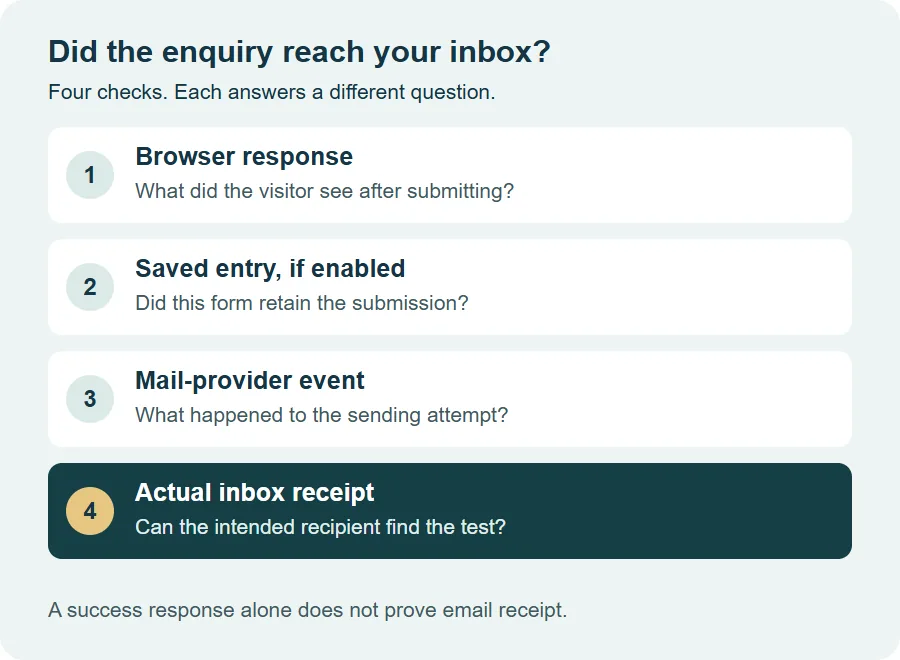
- Browser response: What did the visitor see after pressing Submit?
- Saved entry: If storage is available and enabled, is the submission in the correct form's entries?
- Sending event: Did the configured mail service record an attempt, rejection, delay or delivery event?
- Inbox receipt: Can the intended recipient find the matching message and read its contents?
A provider's delivery event may describe acceptance by the receiving server. Read that provider's definition; it does not necessarily mean the message reached the main inbox or was read. If there is no saved entry, do not assume an old enquiry can be recovered later.
1. Test the right form before changing anything
A website may have a contact page, a callback popup and a separate landing-page form. Testing one does not check the others. Open the public page as a visitor and note which form you used.
- Use contact details you control. Add a unique marker such as Owner delivery test 16 Nov 10:30 in the message.
- Record the page URL, device, time and timezone. Complete required fields and the normal anti-spam check.
- Submit once and record the exact response. Avoid repeatedly sending the same test while a queue may still be processing it.
- Check the intended mailbox, Spam or Junk, quarantine and any forwarding destination. Search for the marker rather than only the sender name.
- If your plugin stores entries or your mail provider has logs, look for the same test time and recipient there.
Keep customer information out of screenshots you share with support. A test with your own details is enough to describe the fault. Never send passwords, API keys or private email content through a public troubleshooting form.
2. Check WPForms or Contact Form 7 settings
First confirm the notification belongs to the form embedded on that page. An old form copied into a new landing page can retain an outdated destination or a rule that no longer fits the fields.
If you use WPForms
Open that form's notification settings. Confirm notifications are enabled, the recipient address is correct and any conditional notification rule matches your test. Check field tags as well as typed addresses. WPForms' notification troubleshooting guide covers these settings.
If you use Contact Form 7
Check the form's Mail tab and its configuration warnings. Make sure mail-tags refer to fields that actually exist. The plugin's official FAQ distinguishes mail failures from suspected-spam responses and explains why a green response can still be followed by missing mail.
Entry storage is a separate question. Contact Form 7 does not save submitted messages by itself; its FAQ points to Flamingo for that purpose. Check what was already installed and enabled before promising to recover anything.
3. Check who sends the notification
The person filling in your form should not normally become the notification's From identity. Your website cannot simply send authenticated mail on behalf of every visitor's Gmail, Outlook or company domain.
A useful setup: From is an address your sending service authorizes. Reply-To uses the visitor's validated email field, where supported. Your staff can reply to the enquiry while the notification keeps a consistent sender identity.
Then check how WordPress sends mail. An authenticated SMTP or API connection can provide a supported sending route and useful logs. Installing a mail plugin alone is not enough: the account must be connected, the sender approved and the provider's configuration completed. Use one clearly configured sending route rather than stacking competing mail plugins.
If messages are rejected or filtered, ask the mail provider or host to check the actual error and domain authentication. SPF, DKIM and DMARC must fit the services that really send your mail. Follow provider-specific instructions and review existing DNS records before editing them. A generic DNS value copied from another website can disrupt legitimate email.
Google's sender guidelines require authentication for mail sent to personal Gmail accounts and recommend SPF, DKIM and DMARC. The stricter bulk-sender requirements are separate; a missing contact-form notification is not a reason to start a bulk-email setup.
4. Match the symptom to the next check
| What you observe | What to check next |
|---|---|
| Submit spins, fails or never shows a response | Record the browser or form error. Check the relevant request, anti-spam result and recent changes before investigating mail delivery. |
| Entry exists, notification is missing | Check notification settings, conditional rules and the configured sending route. Entry storage and sending are separate. |
| Sending provider records a rejection | Read its exact reason: for example, sender authorization, credentials, account limits or recipient rejection. |
| Provider records acceptance, inbox is empty | Check its event definition, recipient address, Spam, quarantine and forwarding. Ask the receiving provider to trace the message if needed. |
| Only one form or recipient fails | Compare that form's settings or that mailbox's rules with the working test. Keep the investigation scoped to the difference. |
If the problem began after a plugin update, cache change or firewall rule, record when it started. Have a developer reproduce the issue on staging or inspect the exact blocked request. Do not turn off all website security or anti-spam protection on a live business site to see what happens.
5. Verify the repair before buying more traffic
After a change, repeat the actual form test from the public page. Check the notification's recipient and content, Reply-To behaviour and any confirmation email you intentionally enabled. Test the contact page and callback form separately, including a phone-sized screen.
Agree on what the repair includes. A useful handover records the cause, the setting changed, the test time and which messages arrived. It should also identify any remaining gap, such as missing historic entries or a confirmation email that was not part of the test.
Keep website reporting honest too. A click on Contact or Submit is different from a completed form submission, and a submission is different from a qualified enquiry. Define those events separately before using them to judge advertising performance.
For ongoing care, include a controlled form-delivery check after relevant updates or mail changes in your website maintenance plan. If delivery works but enquiries remain low, our guide to why a website gets traffic but no customers covers the wider content and conversion questions.
Need help finding the missing email?
BridgeWeb supports businesses in Toronto, Ontario, Canada. Tell us the form URL, what response you see and when your test was submitted. We can assess the form and sending setup before recommending a repair.
Common questions
Why does my WordPress form say sent when no email arrives?
A success response can mean the website processed its mail request without an immediate error. It does not prove delivery to your inbox. Check the notification recipient, mail-provider event, Spam or quarantine, and actual receipt using one identifiable test.
Will an SMTP plugin fix every missing form email?
No. It can connect WordPress to an authenticated sending service, but it will not correct every form setting, spam rejection, disabled notification or receiving-mailbox problem. Find where the test stops before choosing the repair.
Should the visitor's address be the From address?
Use a From address authorized by your sending service. Put the visitor's validated email field in Reply-To when your form supports it, so you can reply without presenting your website as the sender of mail from a domain it does not control.
Can I recover enquiries that were not emailed?
Only if another system retained them, such as enabled form-entry storage, a CRM integration or suitable provider logs. Retention varies. A form that did not save submissions cannot necessarily recover old messages after email is repaired.
Do I need a website redesign to fix this?
Usually the first step is a focused diagnosis of the form, sending connection and receiving mailbox. Ask for that assessment before commissioning a redesign. A larger rebuild may be appropriate when the underlying site has broader support or usability problems.
Sources and scope
Checked 16 November 2026. These are general troubleshooting steps, not a diagnosis of your website. Plugin features, mail-provider events and entry retention vary.

